





Guide · Prerecorded video
How can a video be accessible for Deaf people?
Many Deaf people need sign language, not only captions, and a signer they can actually see. What W3C and broadcast regulators recommend on size, switchable overlays and contrast, and how Acceasy applies it.
- 1/9Of the screen: the minimum for the interpreter on Colombian TV
- 1/6Of the TV screen area: the minimum in Ofcom’s UK guidance
- 1/3Of the image, ideally, for news in France’s sign-language charter
- ½Of the screen height: the World Federation of the Deaf’s minimum
The short answer
A video is accessible to Deaf people who use a sign language when it offers sign language as well as captions, and when the signer can actually be read: large enough to see the hands, the face and the upper body, with enough contrast against the background, on the screen where people watch it.
W3C recommends delivering the signer as a separate, synchronized layer rather than a small image burned into the picture, so that each viewer can switch it on or off and enlarge it, and broadcast regulators encourage tools that let viewers change the signer’s size. WCAG asks for sign language at Level AAA (success criterion 1.2.6) but sets no size.1 The regulators and public bodies that set one range from one ninth to one third of the screen, and the World Federation of the Deaf asks for at least half the screen height.
A note on words: standards say “interpreter” and “interpretation”. In a prerecorded video the signing is usually a translation prepared in advance, so this guide often says “signer” for the person on screen.
Captions are not enough
For many Deaf people a sign language is their first language, and the written language of their country is a second one. W3C makes the point in its explanation of WCAG:2
“Written text, such as that found in captions, is often a second language.”
W3C adds that some Deaf people do not read written language well, “especially at the speed of most captions”, and that some people want sign language and captions at the same time.3 The UK regulator tells broadcasters the same: “subtitling should not be seen as a substitute for sign-language.”4
That is why WCAG has a success criterion for it. At Level AAA, 1.2.6 reads: “Sign language interpretation is provided for all prerecorded audio content in synchronized media.”1 W3C is also candid: “Sign language is not required in most web accessibility policies.”3 On the web, sign language is usually a choice you make for your Deaf audience. Some broadcasting laws do name it: Brazil’s, for example, requires TV broadcasters to allow a window with a Libras interpreter.5 More in our guide to WCAG AAA and sign language.
A signer that is too small is not accessible
Sign languages use the hands, the face and the upper body at the same time. If any of them is too small to read, meaning is lost. W3C’s guidance for producers puts it simply: “Ensure the signer is large enough”, and gives the reason: “Viewers need to be able to clearly see all movements and facial expressions.”3
“If the video stream is too small, the sign language interpreter will be indiscernible.”
The UK regulator is more precise. Interpreters should be large enough for their “facial expressions, hand gestures and upper body to be easy to see and understand”, and providers should take into account the platforms where the content will be played.4 In practice, a signer who is easy to read on a television can be too small on a phone.
The minimum sizes that exist
W3C sets no number. Several regulators and public bodies do, and they disagree. They were written for television and on-demand services rather than for websites, but they are the best official reference for how big a signer needs to be.
| Minimum size | Country | Source | Type of text |
|---|---|---|---|
| 1/9of the screen | CO | Colombia: Comisión de Regulación de Comunicaciones (CRC), Resolución 5050 de 2016, art. 15.2.3.6. Framed from head to waist, with space at the sides.6 | Binding regulation for TV operators |
| 1/6of the TV screen area | UK | United Kingdom: Ofcom, Guidelines on Providing Television and On-Demand Access Services, 5.18.4 | Regulator guidance: best practice that accompanies the statutory code |
| 1/6of the screen | ES | Spain: CNLSE (Real Patronato sobre Discapacidad), technical recommendations for sign language on television, 2020.7 | Public-body recommendation |
| 1/3of the image, ideally, for news and information | FR | France: Charte de qualité pour l’usage de la LSF dans les programmes télévisés (2015), restated in Arcom’s 2022 guide.8 | Voluntary charter signed by the regulator, the government and Deaf associations |
| ½ × ¼half the height and a quarter of the width of the screen | BR | Brazil: Ministério da Cultura, Guia para Produções Audiovisuais Acessíveis (2016), relaying the ABNT NBR 15290 standard for television.9 | Government guide relaying a technical standard |
| ½of the screen height | Intl | International: World Federation of the Deaf (WFD), Position Paper on Accessibility (2019).10 | Community position of the international Deaf movement |
The WFD is blunt about it: “Smaller insets are contradictory to the purpose of having interpreter insets.”10 A signer in a box a quarter of the width and a quarter of the height of the picture, which is 1/16 of the screen, is below every minimum in this table.
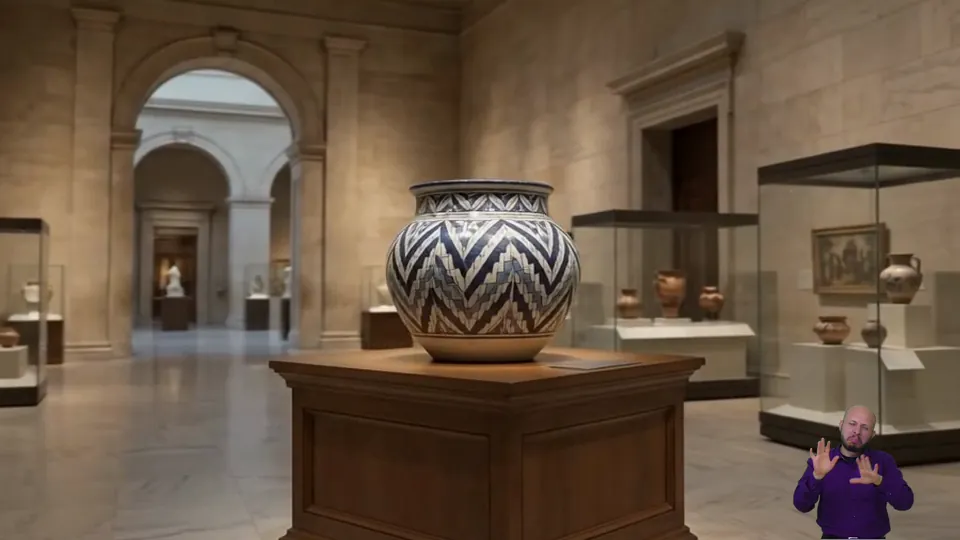
Too small
1/16 of the screen
- Below every official minimum in the table above.
- Hands, fingers and facial expressions are hard to read, more so on a phone.
- If it is burned in, nobody can enlarge it.
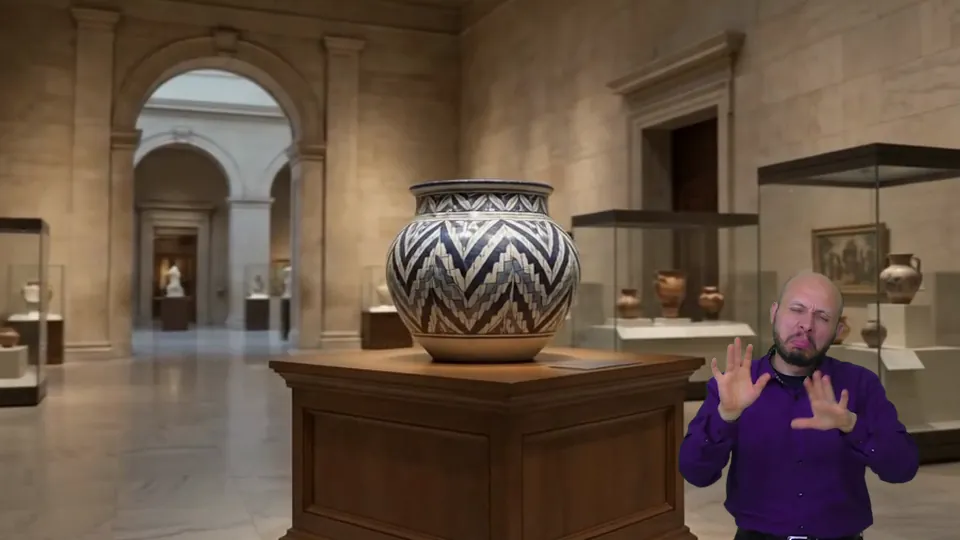
Large enough
Half the screen height
- The minimum the World Federation of the Deaf asks for.
- Face, hands and upper body are easy to read.
- It covers more of the picture, which is why viewers should be able to move it or hide it.
Illustrations made by U-I-X from our own footage: the same frame with the same signer at two sizes. They are not screenshots of a real broadcast.
Burned in or overlaid: why a separate layer works better
There are two ways to add a signer to a video, and W3C accepts both as ways to meet success criterion 1.2.6.
Burned into the picture
The signer is edited into the video image (W3C technique G54). It plays in any player, but W3C names the drawback: it gives “a lower resolution image that cannot be easily enlarged without enlarging the entire image.”11 Its advice: make sure the video can be played full screen, or that the signer can be shown at the size it would have in full screen.11 A burned-in signer also cannot be turned off: everyone sees it, and it covers part of the picture for everyone.
A separate, synchronized layer
The signer is a second video, synchronized with the first, which the player shows on top of the video or next to it (W3C technique G81).
“… this secondary video stream can be overlaid on top of the original video or displayed in a separate window.”
W3C’s example is an interpreter stream “that can be displayed, at the viewer’s option”, and the goal of the technique is access “without affecting the presentation of the material for all viewers.” It also notes that the signer may be enlarged separately from the original video.12
W3C’s Media Accessibility User Requirements, a note that lists what media players should support, go further. Systems that support sign language should:13
- play the sign-language video in sync with the main video [SL‑2];
- show it as picture-in-picture, as an alpha-blended overlay, as a parallel video, or as the main video with the original in a small window [SL‑3];
- let viewers see which tracks are available and switch them on or off during playback [DAC‑7].
“Support the interactive activation/deactivation of a sign-language track by the user.”
W3C’s production guidance says the same in plain words: make it easy to get to the video with sign language and to the video without it, for example with “a large visible toggle button” under the player.3
Regulators point the same way. Ofcom encourages providers “to consider customisation tools to change the size of the signer where possible.”4 France’s 2015 charter commits its signatories to explore an optional overlay on the picture, with control of the window’s size and position.8 The WFD cites Brazil’s digital TV, which offers the interpreter as an optional picture-in-picture, “making it possible to readjust the size and position”.10
To be precise: these are recommendations, not legal requirements. We found no law or regulation that requires a separate, switchable sign-language track. W3C accepts a burned-in signer (G54), and its own guidance notes that sign language is often provided as an overlay in the bottom-right corner of videos.14 The European ICT standard EN 301 549 makes a one-step on/off control mandatory only for subtitles, audio description and spoken subtitles, and calls it best practice for the other accessibility features of audiovisual content.15
Contrast and visibility: a choice, not one setting
Size is not enough if the signer blends into the background. W3C advises: “Usually it is best if the background and the signer’s clothing are solid colors that contrast with their skin tone.” It also asks for good lighting.3 Ofcom asks for plain, contrasting clothing, or a signer placed outside the programme picture.4
Some viewers need more. Spain’s CNLSE notes that Deafblind people may need a larger signer, on a window with a plain, dark background.16 France’s regulator advises against a transparent background behind the interpreter and prefers an opaque one, so that Deaf people with low vision can follow.8
“Provide the user with the ability to control the contrast and brightness of the content within the playback viewport.”
W3C itself treats this as a “should”, because not every device can do it.13 And the sources do not all agree: a transparent overlay hides less of the picture, while an opaque, dark background is easier to read for Deaf people with low vision. No single setting suits everyone. The honest conclusion is to let each viewer choose. For live streams, Acceasy Live gives each viewer the same kind of choice: a transparent, black or blue background behind the interpreter. More in our guide to accessible live streaming.
A checklist for video owners
Six points that cover what the sources above agree on.
Offer sign language and captions
Captions for everyone (WCAG 1.2.2, Level A),17 and a sign-language version for Deaf viewers whose first language is signed (1.2.6, Level AAA).
Make the signer large enough
At least what your market sets (1/9 to 1/3 of the screen); half the screen height is what the WFD asks for. Check it on a phone.
Keep it separate and in sync
Deliver the signer as its own synchronized layer, so it can be enlarged without enlarging the whole picture.
Let viewers switch it on and off
A visible control that also works from the keyboard, so nobody has to hunt for the signer, or watch one they do not need.
Let viewers move it and pick the background
So the signer never hides key content, and Deaf viewers with low vision can choose an opaque background.
Film for legibility, with people
Plain, contrasting clothes and background, good light, the whole signing space in frame, and human signers: W3C finds avatars “not robust enough to be adequate.”3
And ask Deaf viewers. The WFD recommends planning media interpreting in close consultation with national Deaf associations.10
How Acceasy Player and Acceasy Web apply these recommendations
We built Acceasy Player for prerecorded video and Acceasy Web for websites around the same idea: a human sign-language translation in its own layer, which each person controls. Here is how each recommendation maps to what the two products do.
| Recommendation | Reference | Acceasy Player | Acceasy Web |
|---|---|---|---|
| Large enough to readW3C WAI, G54, Ofcom 5.18 | G54 | Viewers resize the translation window from its top-left corner. Picture-in-Picture mode (H) enlarges the signing layer to the foreground and minimizes the main video. | Visitors resize the translation window freely. |
| A separate, synchronized layerW3C G81, MAUR SL-1 and SL-2 | G81 | The translation is a separate layer, not burned into the video. It stays in sync when viewers skip 10 seconds (Y/I) or change the speed from 0.25× to 2× (M/N). | A layer over your existing page. Elements that have a translation show a small sign-language icon; each translation plays in its own window. |
| Switch it on and offMAUR SL-5 and DAC-7, W3C WAI | SL-5 | Viewers toggle the translation window with J. | Optional and on demand: visitors activate it, and switch the window on and off. |
| Move it so it hides nothingMAUR SL-3, Ofcom 5.18, W3C WAI | SL-3 | Viewers drag it anywhere over the video. | Visitors drag it anywhere on the screen. |
| Contrast the viewer can changeMAUR VP-4, Arcom, CNLSE | VP-4 | A transparent or a black background behind the signer, switched with K. | The translation window can be adjusted for contrast. |
| Every control from the keyboardMAUR IC-1, W3C WAI Media Player18 | IC-1 | Every control has a key, designed for Deaf users with low vision: J, K, H, Space or U, Y/I, M/N, C and F. | — |
| Captions as well as sign languageWCAG 1.2.2, W3C WAI | 1.2.2 | Closed captions in up to five languages (C). | — |
| Human signers, not avatarsMAUR 2.8, W3C WAI | 2.8 | Recorded by human translators, in any sign language. U-I-X records ASL (with Visual Voice Media), BSL, LSC, LIBRAS (with Um Tradutor) and International Sign; the player also plays clips signed by your own interpreters. | Human, meaning-based translation by the same team, or clips signed by your own interpreters. |
A dash means the feature is not part of that product. The “Reference” column gives the main W3C reference for each row (MAUR: Media Accessibility User Requirements). Acceasy Player covers WCAG 1.2.6 for the videos it plays; it does not make a whole site conformant on its own. For live streams, Acceasy Live offers a transparent, black or blue background behind the interpreter.
Acceasy Player is embedded with a code snippet, like any standard video player, and viewers install nothing. Your translation team, or ours, uploads the clips and syncs them on a timeline in the Acceasy Video Platform; we process and render, and the accessible video is ready to embed within 36 hours. Acceasy Web is added to an existing site with one script, and your site’s design and code are not rebuilt.
Sources
- W3C, Web Content Accessibility Guidelines (WCAG) 2.2, Success Criterion 1.2.6 Sign Language (Prerecorded), Level AAA. W3C Recommendation, 12 December 2024. Accessed 25 Oct 2026.
- W3C WAI, Understanding Success Criterion 1.2.6: Sign Language (Prerecorded), Intent. Updated 6 September 2026. Accessed 25 Oct 2026.
- W3C WAI, Sign Languages, in Making Audio and Video Media Accessible. Updated 17 September 2024. Accessed 25 Oct 2026.
- Ofcom (United Kingdom), Ofcom’s Guidelines on Providing Television and On-Demand Access Services, section 5 Signing, paragraphs 5.5, 5.17 and 5.18. April 2024. Accessed 25 Oct 2026.
- Presidência da República (Brazil), Lei nº 13.146, de 6 de julho de 2015 (Lei Brasileira de Inclusão), art. 67. Accessed 25 Oct 2026.
- Comisión de Regulación de Comunicaciones (Colombia), Resolución CRC 5050 de 2016, arts. 15.2.3.6 and 15.2.3.9 (from Resolución ANTV 350 de 2016). Accessed 25 Oct 2026.
- CNLSE, Real Patronato sobre Discapacidad (Spain), Recomendaciones técnicas y lingüísticas para una correcta emisión de lengua de signos en televisión. 2020. Accessed 25 Oct 2026.
- Arcom (France), Guide de mise en image de la Langue des signes française, March 2022, with the Charte de qualité pour l’usage de la LSF dans les programmes télévisés of 15 January 2015 (annex, points 4 and 7). Accessed 25 Oct 2026.
- Ministério da Cultura, Secretaria do Audiovisual (Brazil), Guia para Produções Audiovisuais Acessíveis, 2016, chapter 4 (items 4.1.1 to 4.1.3). Accessed 25 Oct 2026.
- World Federation of the Deaf, Position Paper on Accessibility: Sign Language Interpreting and translation and technological developments, section 3 Media (TV) interpreting. 7 February 2019. Accessed 25 Oct 2026.
- W3C WAI, Technique G54: Including a sign language interpreter in the video stream. Updated 6 September 2026. Accessed 25 Oct 2026.
- W3C WAI, Technique G81: Providing a synchronized video of the sign language interpreter that can be displayed in a different viewport or overlaid on the image by the player. Updated 6 September 2026. Accessed 25 Oct 2026.
- W3C, Media Accessibility User Requirements, W3C Working Group Note, 3 December 2015: 2.8 Sign translation [SL-1] to [SL-5], 3.1 [IC-1], 3.5 [DAC-7], 3.7 [VP-4]. Accessed 25 Oct 2026.
- W3C WAI, Audio Content and Video Content, in Making Audio and Video Media Accessible. Updated 17 September 2024. Accessed 25 Oct 2026.
- ETSI, CEN and CENELEC, EN 301 549 V4.1.1 (2026-09), Accessibility requirements for ICT products and services, clause 7.3 User control of audiovisual accessibility features, note 2. Accessed 25 Oct 2026.
- CNLSE, Real Patronato sobre Discapacidad (Spain), Guía de buenas prácticas para la incorporación de la lengua de signos española en televisión, 2017 (NIPO 689-17-006-0), section 6. Accessed 25 Oct 2026.
- W3C, WCAG 2.2, Success Criterion 1.2.2 Captions (Prerecorded), Level A. Accessed 25 Oct 2026.
- W3C WAI, Media Player, in Making Audio and Video Media Accessible. Updated 17 September 2024. Accessed 25 Oct 2026.
Acceasy, in practice
See the translation layer at work
Two products for prerecorded content, with real human signers in a layer each viewer controls.
An embeddable video player with a separate, synchronized sign-language translation. Viewers switch it on, drag it, resize it, enlarge it in Picture-in-Picture mode and set it on a transparent or black background, all from the keyboard too. Closed captions in up to five languages.
WCAG criteria1.2.61.2.2
Explore Acceasy PlayerA sign-language layer for the website you already have. Parts of the page that have a translation show a small icon; visitors open the one they need, then move it, resize it, adjust its contrast or close it. Added with one script.
Questions
Accessible video for Deaf people, answered
Short answers to what video owners ask us most.
Ask us directlyHow big should a sign language interpreter be on screen?
There is no single rule. WCAG sets no size: W3C only asks that the signer be large enough to see every movement and facial expression. Regulators that set a number range from 1/9 of the screen (Colombia) and 1/6 (UK guidance, Spain) to ideally 1/3 for news (France). Brazil’s government guide asks for half the height and a quarter of the width of the screen, and the World Federation of the Deaf asks for at least half the screen height. On a phone, bigger is better.
Is sign language required by WCAG?
Only at Level AAA. Success criterion 1.2.6 asks for sign language interpretation of all prerecorded audio content in synchronized media. Most laws and policies that point to WCAG stop at Level AA, and W3C notes that sign language is not required in most web accessibility policies. Some broadcasting rules go further: Colombia requires Colombian Sign Language in at least one daily news programme on several TV channels, and Brazil requires TV broadcasters to allow a window with a Libras interpreter.
Can I just add captions?
Add captions in any case: WCAG requires them at Level A (1.2.2), and many viewers rely on them. But they do not replace sign language for Deaf people whose first language is signed; for them, written text is often a second language. Ofcom tells UK broadcasters that subtitling should not be seen as a substitute for sign language. The best video offers both, and lets each viewer choose.
Should the interpreter be burned into the video?
A burned-in signer plays in every player, but it cannot be enlarged without enlarging the whole picture, it cannot be turned off, and on a small screen it becomes hard to read. W3C’s alternative, technique G81, is a separate synchronized video that the player overlays or shows in its own window, at the viewer’s option. If you can publish only one file, W3C’s advice is to make sure it can be played full screen, or that the signer can be shown at full-screen size.
Is a transparent or a black background better behind the signer?
It depends on the viewer. A transparent overlay hides less of the picture. France’s regulator recommends an opaque background so that Deaf people with low vision can follow, and Spain’s CNLSE notes that Deafblind viewers may need a larger signer on a plain, dark background. Acceasy Player lets each viewer switch between a transparent and a black background with the K key.
Where should the signer be placed on the screen?
Where it hides nothing important. W3C notes that the signer is usually at the bottom right, and above any news ticker; Ofcom says signers generally appear on the right; Spain’s CNLSE recommends the left when viewers cannot personalise the layout. A layer that each viewer can drag avoids the problem.
Let’s make your videos readable in sign language
Send us a video. We will show you what it needs, and how its sign-language translation would look in Acceasy Player.