





Guide · Live streams, events and meetings
Accessible live streaming with sign language
A live interpreter only helps if Deaf viewers can see them: big enough, on screen the whole time, in good contrast, and ideally in a layer each viewer controls. What official sources ask, and how Acceasy Live and Acceasy Meet answer it.
- 1.2.4Live captions: the only live WCAG 2.2 criterion for Deaf viewers (Level AA)
- 1/6of the TV screen: Ofcom’s minimum for signers, live programmes included
- ½of the screen: the interpreter inset WFD and WASLI prefer for live news
- 20 fpsminimum frame rate for sign language in video calls (EN 301 549)
The short answer
A live stream is accessible to Deaf sign-language users when they get two things at the same time: a qualified interpreter they can actually see, and accurate live captions. WCAG 2.2 only requires the captions (success criterion 1.2.4, Level AA).1 For the interpreter, broadcasting regulators and Deaf organisations set the bar: large enough to read the face, hands and upper body, on screen for the whole broadcast, clearly visible against the background, and synchronised with the speech.23
These are the same qualities that make a recorded video accessible: size, a layer viewers can switch on and adjust, and contrast. Our guide to accessible video for Deaf people covers recorded video. This one covers live streams, webinars, press conferences and video meetings.
What the rules say about live content
Start with the web standard, because most accessibility laws point to it.
“Captions are provided for all live audio content in synchronized media.”
WCAG 2.2 has no success criterion for live sign language. Its only sign-language criterion, 1.2.6, is Level AAA and covers prerecorded media.1 W3C says it plainly: “Sign language is not required in most web accessibility policies.”4
That does not make the interpreter optional for the people who need one. For people whose first language is a sign language, W3C notes, “written text, such as that found in captions, is often a second language.”5 Broadcasting rules go further, and several of them cover live programmes:
- United Kingdom. Ofcom’s guidelines for TV and on-demand access services apply to every signed programme, live ones included. Signers “should take up at least 1/6 of the area of a television screen”, and interpretation should be synchronised with the speech as far as possible.2
- United States. For emergency information on TV, the FCC requires the audio to be made accessible “by using a method of closed captioning or by using a method of visual presentation”.6 It does not require an interpreter on screen.
- Colombia. National and regional open-TV operators must carry Colombian Sign Language (LSC) in at least one daily news or information programme, and presidential addresses and institutional messages must be interpreted into LSC. The interpreter takes at least one ninth of the screen.7
- Brazil. The Brazilian Inclusion Law requires broadcasters to allow a window with a Libras interpreter (art. 67). The duty applies to broadcasting as such, not only to recorded programmes.8
- France. The 2015 quality charter signed with the broadcasting regulator (now Arcom) says the interpreter inset should ideally take one third of the image in news and information programmes. It is a voluntary charter, not a regulation.9
Where a number is set, it ranges from one ninth to one third of the screen, and the World Federation of the Deaf asks for at least half the screen height.10 The full comparison of sizes, with their legal status, is in our guide to accessible video for Deaf people.
This is general information, not legal advice.
Video calls and meetings: the numbers
Two-way video is the one place where standards give hard numbers for sign language. The European standard EN 301 549 applies its clause 6.5 where ICT offers real-time two-way voice and video, as video calls and meeting tools do:11
- Resolution (6.5.2). At least QVGA (320 × 240 pixels); VGA preferred.
- Frame rate (6.5.3). At least 20 frames per second; 30 preferred, “with or without sign language in the video stream”.
- Sync (6.5.4). The voice reaches the user no more than 100 ms before or after the matching video.
- Who is talking (6.5.5, 6.5.6). A real-time indicator of audio activity and, where the tool highlights the active speaker, an indication of everyone communicating, “including those signing”.
- Delay (6.5.1, informative). Overall delays below 400 ms are preferred, and lower is better, down to 100 ms.
“… with frame rate being more important than resolution.”
These are rules for conversation tools, not for one-way broadcasts. EN 301 549 does use the same resolution and frame-rate figures as a reference for sign-language content that accompanies audiovisual media, which it says “may contribute to meeting” its requirement on use without hearing (4.2.4).11
In the United States, the Section 508 standards set the same goal for ICT with two-way voice and real-time video, without numbers:
“… the quality of the video shall be sufficient to support communication using sign language.”
The Access Board describes the difference itself: EN 301 549’s clause 6.5 is a prescriptive standard, while 412.7 is a performance standard.12 More in our Section 508 guide.
Where Acceasy Meet fits
Acceasy Meet is a video-meeting service built for this situation. Your own interpreters appear in floating, background-free overlays, and each participant chooses which interpreters to show, at what size and where. Several sign languages can run at once (the Basic plan allows up to four interpreters in up to four sign languages at the same time), interpreters hand over turns among themselves, and an automatic setup gives each interpreter a clean image from their own camera. Meetings run in the browser from a link or a code, with nothing to install, and the host never has to manage accessibility for anyone. Don’t have interpreters? Talk to us.
Press conferences and emergency broadcasts
When officials speak live, the interpreter is often the only way Deaf people get the information in time. The UN Convention on the Rights of Persons with Disabilities asks States to ensure “the protection and safety of persons with disabilities in situations of risk” (art. 11). It also asks them to give public information in accessible formats in a timely manner, to encourage the mass media to make their services accessible, and to recognise and promote the use of sign languages (art. 21).13 The Convention binds States, not broadcasters, and sets no rule for the screen. Deaf organisations do:
“The interpreter should be displayed in the full screen image at all times, with no text or graphics covering the interpreter.”
The same guidelines, written during the COVID-19 pandemic, ask that an interpreter be “physically present and visible on camera alongside whomever is speaking”. For news with the interpreter in the studio, they prefer an inset of at least half the screen, or a separate box filling 25% of the screen, outside the programme picture.3
- Write it down. WASLI and WFD ask TV stations to have written policies so that the interpreter at a media conference is visible in the broadcast, next to the speaker or in a frame inserted on screen, and to make sure that “camera operators, directors and producers are aware of these policies”.14
- Keep the camera on the interpreter. In 2020 the US National Association of the Deaf wrote to broadcasters: “There have been too many instances of broadcasters having the camera only on the speaker.” It asked that interpreters be clearly visible and adequately lit.15
- Qualified interpreters and captions. For officials’ announcements on local TV, the US Department of Justice’s ADA tool kit for state and local governments says that “providing qualified sign language interpreters and open captioning will ensure that all people tuning in are able to access the information”. The page is archived and warns that parts may not reflect current ADA regulations.16
- Know the legal floor. The FCC rule for emergency information asks for captions or another visual presentation of the audio, not an interpreter.6 In Colombia, presidential addresses and institutional messages on TV must carry Colombian Sign Language.7
The same three needs, live: size, control and contrast
Live production adds time pressure, but what Deaf viewers need from the interpreter does not change.
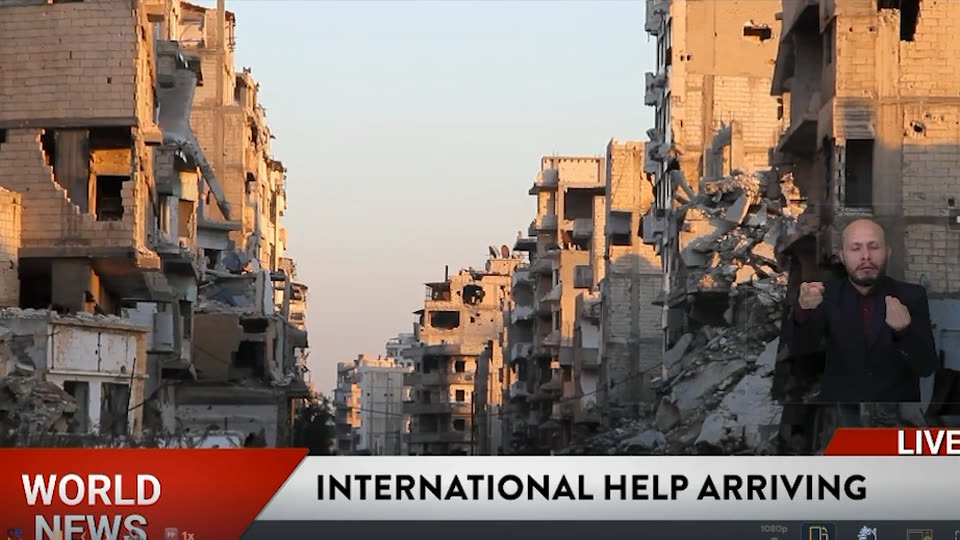
What usually happens
A small, fixed interpreter
- Burned into the picture, the same for every viewer.
- Hard to read on a phone.
- Cannot be enlarged without enlarging the whole stream.
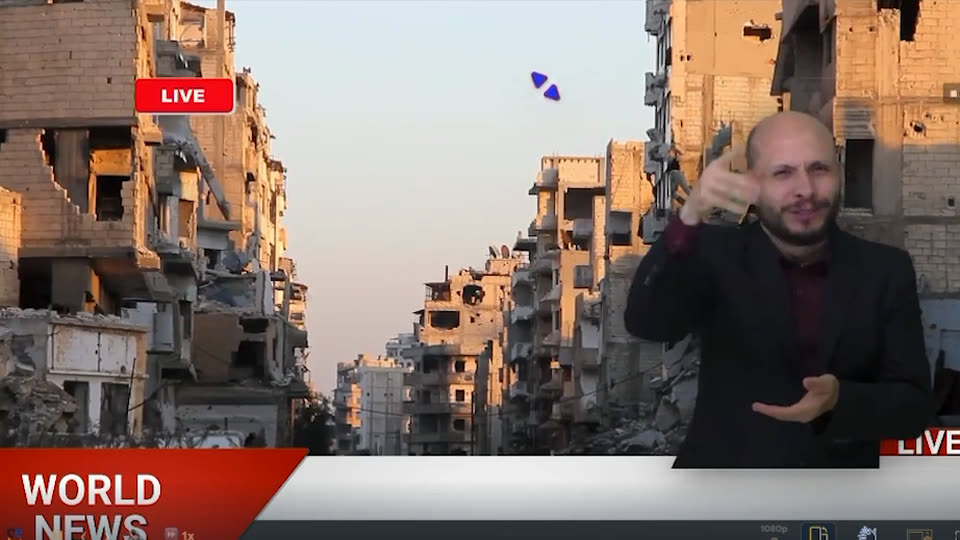
What Deaf viewers need
An interpreter they control
- Large enough for face, hands and upper body.
- Switched on, moved and resized by each viewer.
- In the picture and in sync for the whole broadcast.
Both pictures are frames of the same Acceasy Live demo stream: the interpreter overlay at a small size (left) and enlarged by the viewer (right).
1. Big enough to read
W3C’s production guidance is simple: “Viewers need to be able to clearly see all movements and facial expressions.”4 Ofcom asks that interpreters be “large enough for their facial expressions, hand gestures and upper body to be easy to see and understand”, without hiding key information, and that providers think about the platforms the programme will be watched on.2
“Smaller insets are contradictory to the purpose of having interpreter insets.”
On a phone, even one sixth of the screen is small. That is why the size each viewer can choose matters as much as the size the producer sets.
2. A layer viewers switch on, move and resize
W3C’s Media Accessibility User Requirements are written for any media, live included. They ask players to support a sign-language video synchronized with the programme (SL-2) and shown as picture-in-picture, an overlay or a parallel video (SL-3). Requirement SL-5 reads: “Support the interactive activation/deactivation of a sign-language track by the user.”17 Ofcom encourages providers “to consider customisation tools to change the size of the signer where possible”.2
Broadcasters have tried it. Spain’s national sign-language centre (CNLSE) describes a web player ready for accessible live events whose interface is fully configurable, so that the position and size of each element can be changed, and a March 2016 RTVE pilot that streamed the programme «Los desayunos de TVE» live with the sign-language window laid out to CNLSE’s recommendations. The same guide notes the limit of doing this on television: every size option means one more video stream for the broadcaster to produce.18 The WFD points to Brazil’s digital TV, which foresees the interpreter “as an optional picture-in-picture feature, making it possible to readjust the size and position”.10
3. Contrast and light
W3C’s advice: “Usually it is best if the background and the signer’s clothing are solid colors that contrast with their skin tone.” And: “Ensure good lighting to help make the signer clearly visible.”4 Ofcom says the same: plain, non-patterned clothing of contrasting colour.2
Live, contrast is decided at the camera. MAUR asks players to let users control contrast and brightness, and adds: “In live content, it may even be possible to adjust camera settings to achieve this requirement.”17 Deaf people with low vision need more. CNLSE notes that Deafblind viewers may need a larger signer on a plain, dark background,18 and Arcom prefers an opaque background behind the interpreter inset for Deaf people with low vision, advising against a transparent background or one that does not contrast with the interpreter’s skin.9
Live captions: needed, but not a substitute
Captions and sign language serve different people, and many Deaf viewers use both. WCAG asks for live captions at Level AA (1.2.4),1 MAUR asks players to support live captioning (CC-27),17 and Ofcom asks that signed programmes also be subtitled.2
“… subtitling should not be seen as a substitute for sign-language …”
Acceasy Live adds AI live captions and live caption translation in eight languages by default: English, Spanish, Portuguese, German, French, Italian, Dutch and Russian. Each viewer picks their caption language, and other languages are available on request.
Acceasy Meet offers live captions and caption translation in the same eight languages. Speakers may use one or two of them, and each participant picks the language they read.
How Acceasy Live and Acceasy Meet answer these recommendations
Acceasy Live is for one-way live content: broadcasts, streams, webinars and events. Acceasy Meet is for video meetings. The table maps each recommendation above to what each product does.
| Recommendation | Source | Acceasy Live | Acceasy Meet |
|---|---|---|---|
| SizeFace, hands and upper body easy to see; from 1/9 to 1/3 of the screen where a number is set | Ofcom | Each viewer resizes the interpreter, so they can go beyond the recommended minimum sizes. | Each participant sets the size of each interpreter. |
| Separate layerSign language as its own synchronized track, not burned into the picture | MAUR | An overlay on top of the stream, transparent or on a black or blue background, as each viewer chooses. Nothing is burned into the broadcast, and there is no separate sign-language version to maintain. | Interpreters appear in floating, background-free overlays. |
| On and offEach viewer switches the sign-language track on or off | MAUR | Each viewer switches the interpreter on or off without changing what other viewers see. | Each participant chooses which interpreters to show. |
| PositionThe signer does not hide key information on screen | Ofcom | Each viewer moves the interpreter anywhere on the stream. | Each participant chooses where each interpreter appears. |
| ContrastPlain clothing and background that contrast with the skin; good light | W3C | Each viewer chooses the background behind the interpreter: transparent to keep the footage visible, or black or blue for an opaque, contrasting background. Contrast also starts with how the interpreter is filmed: plain clothing, even light. Viewers can also move the interpreter to where they see them best. | An automatic setup gives each interpreter a clean image from their own camera, and each participant can adjust the background behind the interpreters. |
| Live captionsCaptions for all live audio (WCAG 1.2.4) | WCAG | AI live captions and caption translation in eight languages by default, other languages on request. Each viewer picks theirs. | Live captions and caption translation in eight languages. Each participant picks theirs. |
| InterpretersAppropriately qualified human interpreters | Ofcom | Live interpreting by U-I-X in American Sign Language (with Visual Voice Media), British Sign Language, Colombian Sign Language, LIBRAS (with Um Tradutor) and International Sign, or your event’s own interpreters in any other sign language. | Your own interpreters, in any sign language, several at once. |
Two honest points. First, a transparent overlay and an opaque background answer different needs: the overlay keeps the footage visible, while Arcom prefers an opaque, contrasting background for Deaf viewers with low vision.9 Acceasy Live leaves that choice to each viewer: a transparent, black or blue background. Whatever the background, contrast still starts with how the interpreter is filmed, and the freedom to enlarge and move the interpreter helps most where the footage behind is busy. Second, no product makes a stream “compliant” on its own: Acceasy covers the interpreter and caption layer, and the rest of your page and player still has to meet WCAG.
In practice: Acceasy Live runs in an embeddable broadcast player on your website, in real time with minimal delay; viewers need no downloads, special hardware or software. Acceasy Meet runs in the browser.
A checklist for event organisers
Book qualified interpreters
In the sign language of your audience. Ofcom asks for interpreters who are appropriately qualified, including for working on screen.2
Keep them in the picture
From the first word to the last, never covered by graphics or captions, and next to the speaker at a press conference.3
Make them big enough
At least the size your regulator sets, framed with room for the hands, and larger for news. Let viewers enlarge them where you can.
Light and dress for contrast
Plain clothing that contrasts with the skin, a plain background and even light without shadows.4
Give viewers control
A sign-language layer each viewer can switch on, move and resize, instead of a separate sign-language version of the stream.
Caption, and let them finish
Add live captions, and do not end the broadcast before the interpreter has finished: interpretation runs slightly behind the speech.9
Sources
- W3C, Web Content Accessibility Guidelines (WCAG) 2.2, Success Criteria 1.2.4 Captions (Live) and 1.2.6 Sign Language (Prerecorded). W3C Recommendation, 12 December 2024. Accessed 25 Oct 2026.
- Ofcom, Ofcom’s Guidelines on Providing Television and On-Demand Access Services, section 5 Signing, paragraphs 5.5 and 5.12 to 5.18. April 2024. Accessed 25 Oct 2026.
- World Federation of the Deaf and WASLI, Guidelines on Providing Access to Public Health Information in National Sign Languages during the Coronavirus Pandemic, 18 March 2020. Accessed 25 Oct 2026.
- W3C WAI, Sign Languages, in Making Audio and Video Media Accessible. Updated 17 September 2024. Accessed 25 Oct 2026.
- W3C WAI, Understanding Success Criterion 1.2.6: Sign Language (Prerecorded), Intent. Accessed 25 Oct 2026.
- U.S. Federal Communications Commission, 47 CFR 79.2 Accessibility of programming providing emergency information, paragraph (b)(1). Accessed 25 Oct 2026.
- Comisión de Regulación de Comunicaciones (Colombia), Resolución CRC 5050 de 2016, articles 15.2.3.6 and 15.2.3.9 (in Spanish). Accessed 25 Oct 2026.
- Presidência da República (Brazil), Lei nº 13.146, de 6 de julho de 2015 (Lei Brasileira de Inclusão), art. 67 (in Portuguese). Accessed 25 Oct 2026.
- Arcom (France), Guide de mise en image de la Langue des signes française, March 2022, with the Charte de qualité pour l’usage de la LSF dans les programmes télévisés of 15 January 2015, points 4 and 5 (in French). Accessed 25 Oct 2026.
- World Federation of the Deaf, Position Paper on Accessibility: Sign Language Interpreting and Translation and Technological Developments, section 3. February 2019. Accessed 25 Oct 2026.
- ETSI, CEN and CENELEC, EN 301 549 V4.1.1 (2026-09) Accessibility requirements for ICT products and services, clauses 4.2.4 and 6.5. Accessed 25 Oct 2026.
- U.S. Access Board, Revised 508 Standards, 412.7 Video Communication (36 CFR part 1194), and the Board’s comparison with EN 301 549 on the same page. Accessed 25 Oct 2026.
- United Nations, Convention on the Rights of Persons with Disabilities, articles 11 and 21. Accessed 25 Oct 2026.
- WASLI and World Federation of the Deaf, Communication during natural disasters and other mass emergencies for deaf people who use signed language, January 2015. Accessed 25 Oct 2026.
- National Association of the Deaf (US), Letter to the National Association of Broadcasters, 19 March 2020. Accessed 25 Oct 2026.
- U.S. Department of Justice, ADA Best Practices Tool Kit for State and Local Governments, Chapter 7: Emergency Management (archived page). Accessed 25 Oct 2026.
- W3C, Media Accessibility User Requirements, W3C Working Group Note, 3 December 2015: 2.8 Sign translation, 3.7 viewport [VP-4] and captioning [CC-27]. Accessed 25 Oct 2026.
- CNLSE, Real Patronato sobre Discapacidad (Spain), Guía de buenas prácticas para la incorporación de la lengua de signos española en televisión, 2017, pp. 34–38 and section 6.3.1 (in Spanish). Accessed 25 Oct 2026.
Acceasy, in practice
Sign language for live streams and meetings
Two products for live content, with real human interpreters in a layer each person controls. Pick one to watch a short demo.
Live sign-language interpreting as an overlay on your stream. Each viewer switches the interpreter on or off, moves it, resizes it and chooses a transparent, black or blue background, without changing what others see. AI live captions in eight languages by default, other languages on request.
WCAG criteria1.2.4
Explore Acceasy LiveVideo meetings in the browser, where your own interpreters appear in floating overlays. Each participant chooses which interpreters to show, where and how big. Live captions and caption translation in eight languages.
WCAG criteria1.2.4
Explore Acceasy MeetQuestions
Accessible live streaming, answered
Short answers to what event organisers and broadcasters ask us most.
Ask us directlyDoes WCAG require a sign language interpreter for live streams?
No. WCAG 2.2 requires live captions (1.2.4, Level AA) but has no success criterion for live sign language; its only sign-language criterion, 1.2.6, is Level AAA and covers prerecorded media. Some broadcasting rules do ask for sign language on live TV, for example in Colombia (daily news and presidential addresses) and in Brazil, where the Inclusion Law requires broadcasters to allow a Libras interpreter window.
How big should a sign language interpreter be in a live stream?
Large enough to read the face, hands and upper body. Where a number is set, it ranges from one ninth of the screen (Colombia) to one sixth (Ofcom’s guidance in the UK) and, ideally, one third for news (France’s charter). The World Federation of the Deaf asks for at least half the screen height, and its 2020 guidelines with WASLI prefer an inset of at least half the screen for live news. A layer each viewer can resize lets everyone go beyond the minimum.
Are live captions enough for Deaf viewers?
Not for everyone. For many Deaf people a sign language is their first language and written text is a second one. Ofcom’s guidance says subtitling should not be seen as a substitute for sign language. Offer both: an interpreter and live captions.
Should the interpreter be burned into the stream or added as an overlay?
A burned-in interpreter works on every screen, but it cannot be enlarged on its own and everyone sees it at the same size. W3C’s Media Accessibility User Requirements ask players to support a separate, synchronized sign-language track that users switch on and off, and Ofcom encourages tools that let viewers change the signer’s size. No law we found requires a separate track; if you burn the interpreter in, make it large and keep it in the picture the whole time.
What does a video meeting need for sign language users?
Video good enough for signing. EN 301 549 sets at least QVGA resolution and 20 frames per second (VGA and 30 preferred), voice and video in sync within 100 ms, and an indication of who is signing. Section 508 (412.7) asks for video quality sufficient for sign-language communication. Acceasy Meet shows your own interpreters in overlays that each participant places and sizes.
Can we use our own interpreters with Acceasy Live?
Yes. Acceasy Live works with your event’s own interpreters in any sign language. U-I-X also provides live interpreting in American Sign Language (with Visual Voice Media), British Sign Language, Colombian Sign Language, Brazilian Sign Language (LIBRAS, with Um Tradutor) and International Sign.
Planning a live event or a broadcast?
Tell us what you stream. We will help you plan the interpreters, the captions and the player.