
Enhance your website with new Picture-on-Picture sign language translation — fully adjustable.
Have you ever dreamed of sign language translation being as easy to activate as subtitles? That day is here. With Acceasy Player, there's no longer a need to edit the original video to include a translator; the entire process is now seamless and direct. Achieve complete WCAG 1.2.6 accessibility compliance for your video catalog.
Tired of seeing a tiny translator tucked away in a corner? Enjoy complete control over your experience. You can resize and reposition the translation in real-time, adapting it perfectly to your visual needs for barrier-free navigation on any device.
Any person or organization looking to make their videos accessible can integrate with our platform immediately.
We start by following a translation process that ensures accuracy and effective communication. We record translations into American Sign Language, British Sign Language, Colombian Sign Language, Brazilian Sign Language (LIBRAS) and International Sign, and Acceasy Player plays clips signed by your own interpreters in any other sign language. Our ASL services are offered in partnership with  Visual Voice Media.
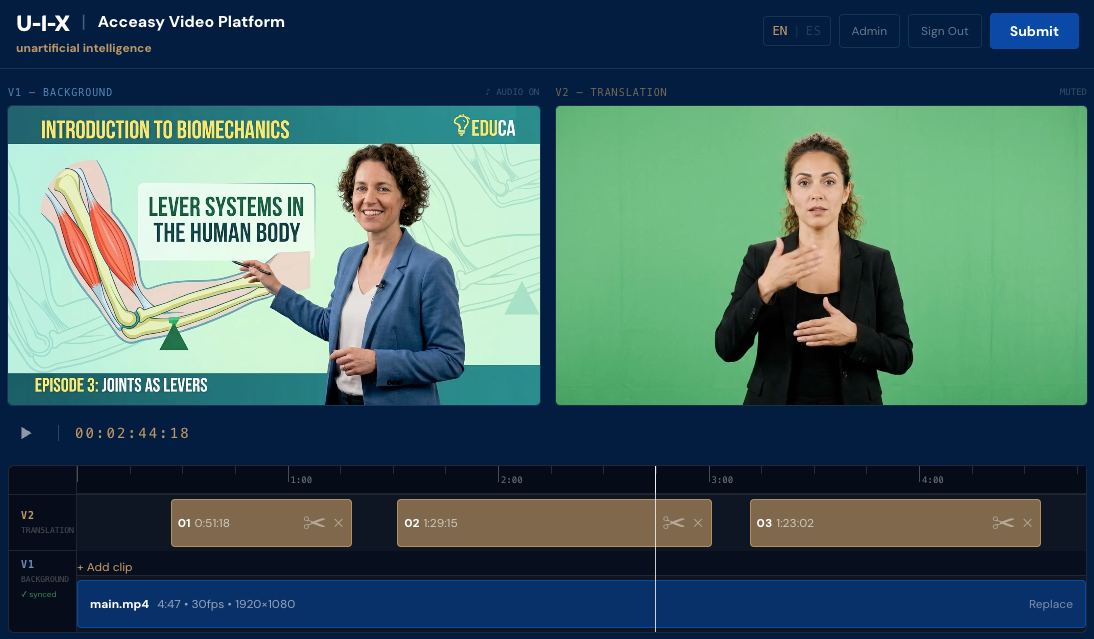
We process both videos to synchronize the two video layers while maintaining the total freedom to adjust the sign language video.
We provide a code snippet (exactly like standard video players) for you to embed on your site. Your users don't need to install anything, and each one decides whether they want to watch the sign language overlay or keep it closed.
Already working with a sign language translation provider? Our platform is designed to integrate seamlessly with your existing workflow, making it easier to publish fully accessible video content.
When you subscribe to Acceasy, you gain access to our Video Platform, where your translation team can upload raw media files and decide how to optimally synchronize their clips to the main video content.
No editing software or technical expertise is required on your side. We handle processing and rendering, and within 36 hours, your fully accessible video is ready to be embedded on your website.
Drag or resize the window freely over the video
The translation layer is a floating window, completely unrestricted, that you can position and scale in real-time without interrupting playback.

Designed specially for Deaf users with low vision: all controls are available via keyboard to avoid relying on a mouse.